E-Scooter Charger Not Working: How to Test, Fix, or Replace (AED 80-300)
You plug in your e-scooter. Nothing happens. No charging light. No indicator on the display. The battery stays at whatever level it was at yesterday. Your charger has stopped working — or has it?
Here’s the thing most people get wrong: when the scooter won’t charge, they assume the charger is dead and buy a new one. But about half the time, the charger is fine. The problem is the battery, the charging port, or the cable between them. Buying a replacement charger and finding out it doesn’t fix the issue costs you AED 80–200 for nothing. And if the actual problem is the battery, a new charger won’t help at all.
This is how to figure out exactly what’s broken before you spend a single dirham. Test the charger, test the battery, test the port — and know whether you need a new charger, a battery fix, or something else entirely.
First: Is It Actually the Charger?
Before you do anything else, you need to separate the charger from the battery. They both feed into the same symptom — “it won’t charge” — but the fix is completely different. A new charger is AED 80–200. A battery replacement is AED 500–1,200. Getting the diagnosis wrong is expensive.
Charger Problem vs Battery Problem: How to Tell
Diagnosis| Symptom | Likely Charger | Likely Battery |
|---|---|---|
| No light on charger at all | Yes | Unlikely |
| Charger light comes on but battery stays flat | Unlikely | Yes — BMS issue |
| Charger light flickers on and off | Yes — failing unit | Could be either |
| Scooter won’t power on AND won’t charge | Possibly | Yes — likely BMS lockout |
| Charger gets hot but no charging | Yes — internal fault | Unlikely |
| Works on a different scooter | Charger is fine | Yes — your battery/port |
If you know anyone with the same brand of e-scooter, borrow their charger. Plug it into your scooter. If it charges, your charger is dead. If it doesn’t charge either, your scooter is the problem — not the charger. This single test eliminates half the guesswork before you buy anything.
How to Test Your Charger Properly
Here’s the thing…
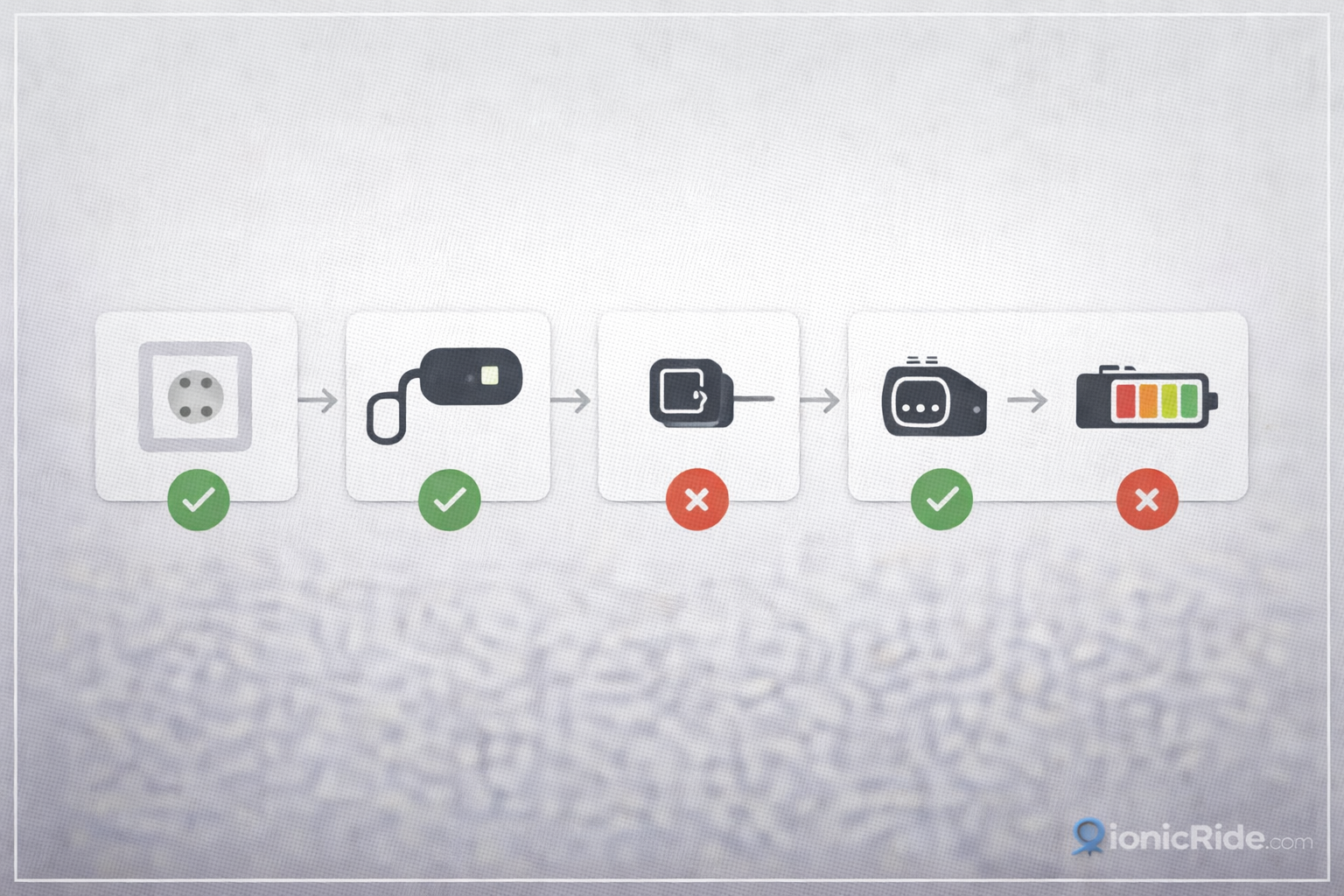
A charger has two jobs: convert mains power (220V AC in Dubai) to the right DC voltage for your battery, and regulate the current so it doesn’t overcharge. When it fails, it usually fails in one of three ways. Here’s how to test each one with a basic multimeter — AED 40–80 at any electronics shop on Sheikh Zayed Road or Dragon Mart.
- 1
Check the Mains Cable and Plug
Look at the cable that goes from the wall socket to the charger brick. Check for visible damage — fraying, cuts, exposed wire. Check the plug prongs for burn marks or corrosion. In Dubai, dust gets into everything — blow out the plug with compressed air. If the cable is damaged, don’t use it. A replacement cable is AED 15–30. Make sure you’re using a working wall socket — test it with another device first.
- 2
Check the Charging Cable (Charger to Scooter)
This is the cable from the charger brick to the scooter’s charging port. Inspect it for damage, especially near the connectors at both ends — this is where cables fail most often. The connector that plugs into the scooter is the most vulnerable. If the pins inside are bent, corroded, or loose, the connection is bad. Clean the pins with a pencil eraser. If they’re bent beyond straightening, this cable needs replacing — AED 40–80.
- 3
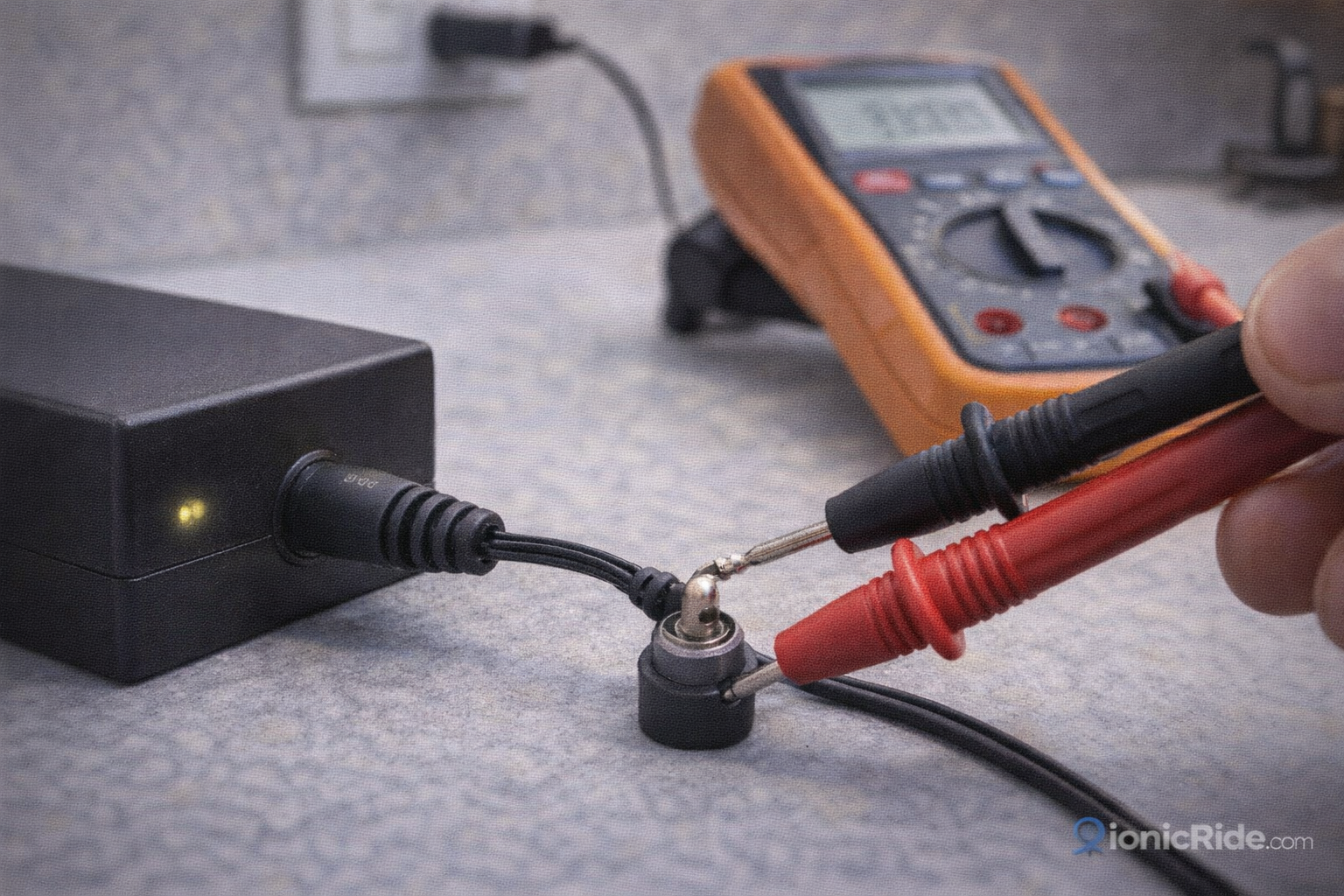
Measure the Output Voltage
Set your multimeter to DC voltage. Plug the charger into the wall but NOT into the scooter. Measure across the output pins of the charging cable (the end that goes into the scooter). A 36V charger should read 42–44V on output when not connected to a battery. If it reads 0V or significantly less, the charger is dead internally. If it reads the right voltage, the charger is producing power — the problem is somewhere else.
- 4
Check the Scooter’s Charging Port
Look inside the charging port on the scooter with a torch. Look for dust, sand, or debris packed in there — Dubai dust gets everywhere. Blow it out with compressed air. Check the pins inside the port for corrosion or damage. If the port pins are corroded or one is missing, the port needs cleaning or replacing. A corroded port that still has all its pins can usually be cleaned and brought back to life.
A customer from Downtown brought in his charger — completely dead, no light, nothing. He’d already bought a replacement from Noon for AED 150 and that one worked fine. We tested the original: output voltage was 0V. Charger was done internally. But then he mentioned he’d been leaving it plugged in 24/7 for three months in his apartment near the Marina. Continuous charging in a hot apartment — even with the AC on — shortens charger life significantly. The replacement charger was the right call, but the habit of leaving it plugged in all the time will kill the next one too.
The Charger Light Guide: What Each Light Means
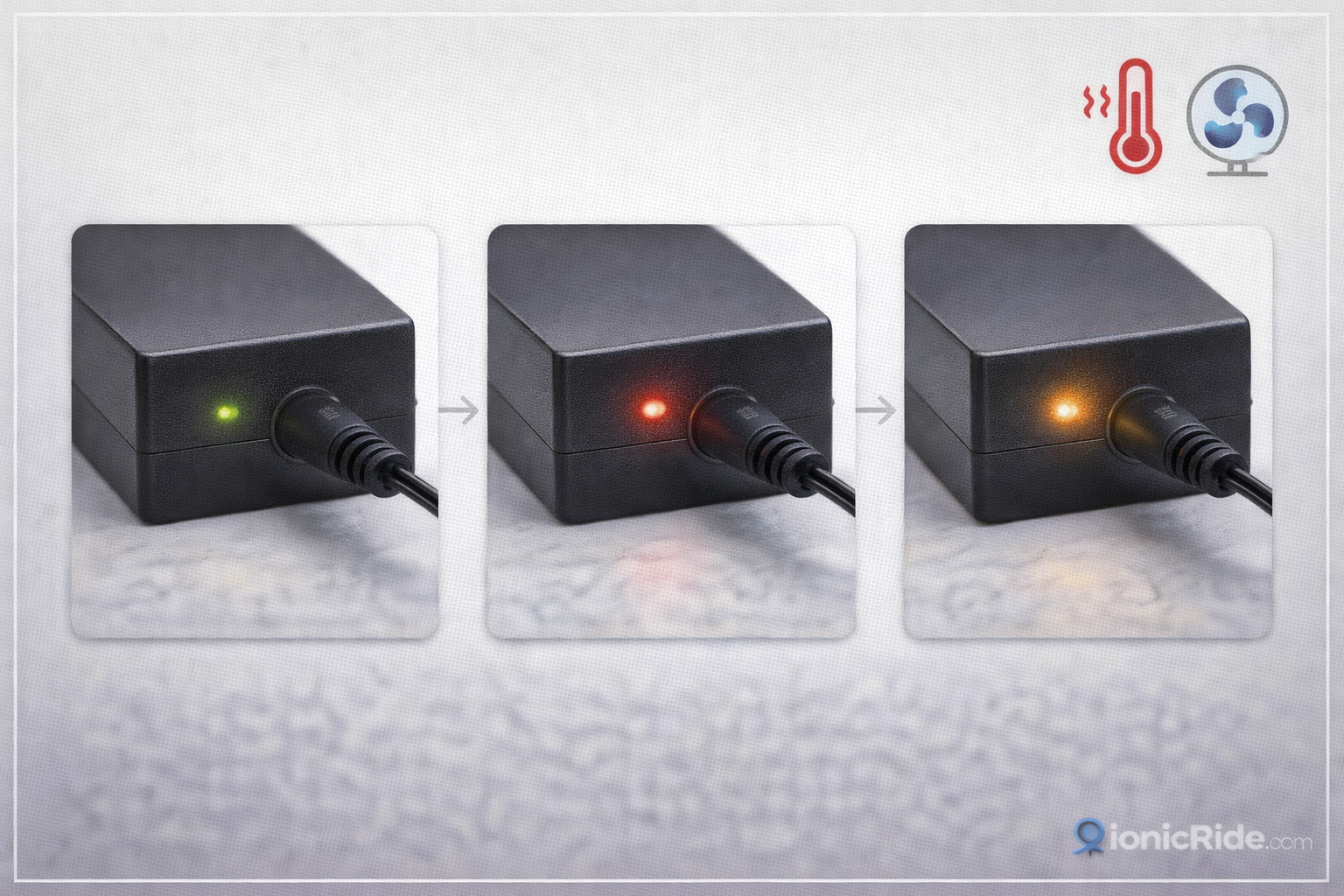
Most chargers have a single LED indicator. The colour and behaviour of this light tells you exactly what’s happening — or what’s gone wrong.
Charger LED Light: What It Means
All Brands| Light Behaviour | Meaning | Action |
|---|---|---|
| Red — solid | Charging normally | Nothing. Wait for it to finish. Normal charge time is 4–6 hours. |
| Green — solid | Charge complete | Battery is full. Unplug to avoid unnecessary trickle charging. |
| Red and green alternating | Charging in progress (some brands) | Normal. Wait. |
| Light flickers or pulses | Unstable connection or charger detecting a fault | Check the cable connection at both ends. If it persists, charger is failing. |
| No light at all | No mains power reaching the charger, or charger is dead | Check the wall socket first. If socket is fine, charger is dead. |
| Green immediately on plugging in | Battery already full — or charger isn’t reading the battery | If battery is actually low, the connection between charger and battery is broken. Check the charging cable and port. |
Replacement Charger Costs: What to Pay in Dubai 2026
Now here’s what most people miss…
Not all replacement chargers are the same. Voltage and amperage must match your scooter exactly. A 36V charger on a 48V scooter won’t charge it. A 48V charger on a 36V scooter will damage the battery. Check the label on your original charger before buying a replacement — the voltage and amperage are printed on it.
Replacement Charger Prices in Dubai (AED)
2026 Prices| Charger Type | Generic (Dragon Mart) | Brand-Matched | Fast Charger |
|---|---|---|---|
| 36V / 2A (standard) | AED 80–120 | AED 150–200 | AED 180–250 |
| 36V / 3A (faster) | AED 100–150 | AED 180–250 | AED 220–300 |
| 48V / 2A (standard) | AED 100–140 | AED 180–230 | AED 220–280 |
| 48V / 3A (faster) | AED 120–170 | AED 200–280 | AED 250–320 |
Never use a charger with a higher voltage than your battery is rated for. A 48V charger on a 36V battery will overcharge and damage it — potentially causing swelling or worse. Match the voltage exactly. The amperage can be slightly higher (a 3A charger on a 2A battery is fine — it just charges faster) but the voltage must be correct.
Generic vs Brand Charger: Does It Matter?
This comes up constantly. Dragon Mart is full of generic chargers at AED 80–120. Brand-matched chargers from Xiaomi or Segway cost AED 150–250. Is the brand one worth the extra money?
✓ Generic Charger Is Fine If…
- Voltage and amperage match exactly
- The output connector matches your scooter’s port
- It has a charging indicator light
- You’re using it as a backup or temporary fix
- Your scooter is an older or budget model
✗ Go Brand-Matched If…
- Your scooter is a Xiaomi or Segway worth AED 2,500+
- The generic charger doesn’t trigger the charging indicator on your scooter
- You want proper overcharge protection built in
- The scooter is still under warranty — generic chargers can void it
- You’ve already burned through two generic chargers
The practical advice: for most riders, a generic charger with the right voltage works perfectly fine. The difference in charging speed and battery health over time is minimal. But if your scooter’s charging system is picky — some Xiaomi models won’t charge from chargers that don’t send the right handshake signal — you need the brand-matched one.
Why Chargers Die Faster in Dubai
Chargers are rated for continuous operation at ambient temperatures up to about 35°C. Dubai regularly hits 45°C outside, and inside an apartment with AC off or near a window, it’s not much better. A charger that’s rated to last 3–5 years in normal conditions starts degrading noticeably after 12–18 months of regular use in Dubai heat.
Charge in a Cool, Ventilated Spot
Keep the charger near the AC vent or on a cool surface. Don’t stack things on top of it. Don’t put it in a drawer where heat builds up. A charger that’s running cool will last twice as long as one that’s sitting in a hot spot. Under the bed near the AC unit is ideal.
Unplug When Charging Is Done
Once the light turns green, unplug the charger from the wall. Leaving it plugged in means it’s still drawing power and generating heat — even when the battery is full. Over months, this continuous low-level stress adds up. It’s the single easiest way to extend charger life in Dubai.
Leave It Plugged In 24/7 in a Hot Room
This is the fastest way to kill a charger. Continuous power draw plus ambient heat equals degradation. A charger left plugged in all summer in a hot Dubai apartment will likely fail within 6–9 months. Unplug it when you’re not actively charging.
Charger is fine but the battery still won’t charge? The problem might be deeper than the charger: E-Scooter Battery Replacement Dubai: Cost, Lifespan & Which Batteries Actually Last
Before you buy a new charger, test the one you have. Measure the output voltage. If it reads 0V, it’s dead — replace it. If it reads the correct voltage, the charger is fine and the problem is your battery or charging port.
Generic chargers from Dragon Mart work for most scooters if the voltage matches. Brand-matched chargers are worth it for newer, higher-value scooters or if your scooter is picky about charging signals. Either way, AED 80–300 covers most replacements.
Chargers die faster in Dubai heat. Charge in a cool spot, unplug when done, and don’t leave the charger plugged into the wall 24/7. A charger that costs AED 120 should last you 2+ years if you treat it right. Killing it in six months means you’re doing something that’s shortening its life.
Charger Not Working — Quick Fix Checklist
- Wall socket working? Test it with your phone charger or another device. If the socket is dead, the charger isn’t the problem.
- Mains cable inspected? Look for cuts, fraying, or damage — especially near the plug and the charger brick.
- Charging cable checked? Inspect the cable from charger to scooter. Pins bent or corroded? Clean or replace the cable.
- Charging port cleaned? Blow out dust with compressed air. Check pins inside for corrosion. Dubai dust packs into everything.
- Output voltage measured? Charger reads 0V on output = dead charger, replace it. Reads correct voltage = charger is fine, problem is elsewhere.
- Replacement charger voltage matched? 36V scooter needs a 36V charger. 48V needs 48V. Wrong voltage will damage the battery.
- New charger in, still won’t charge? The battery is the problem. See the battery replacement guide.
New charger in but the battery still won’t take a charge?
The battery BMS might have locked it out. Here’s how to tell — and whether it’s recoverable.